Gemini Omni Flash is a Google model that takes a video you already shot and changes whatever you ask for: clothes, furniture, background, objects. I ran it on my own footage for two weeks, then cut a short before-and-after clip that pulled 3.8 million views (my site's data as of November 5, 2026). I spent 13 years shooting and running a video production company, so I look at models like this as someone who knows what a shooting day and a reshoot cost. Below: what Omni Flash does well, where it breaks, and who needs it.
In short
Short answer: 1) Omni Flash is first of all a video editor, not a from-scratch generator, and not a Veo replacement; 2) it swaps clothes, furniture and backgrounds and adds objects to footage you already have; 3) it misreads negations and falls apart on overloaded prompts, so ask for one change at a time; 4) moderation is unpredictable; 5) as a generator it is weak but cheap: fine for social, not for film; 6) for new camera angles from a single take I switched to Seedance 2.5.
What Gemini Omni Flash is and where it came from
Google introduced Gemini Omni at I/O on May 19, 2026, and Omni Flash is the first model of the family (Google's announcement). At launch it rolled out in the Gemini app, in Google Flow and in YouTube Shorts. It accepts text, images, audio and video, and you edit by conversation: say what to change, look at the result, then say the next change (The Next Web). Later versions followed: on the Flow screen in my November 6 video you can see Omni 1.2 Flash with continuous 15-second shots, clip extension and per-second pricing. Google changes plans and prices often, so check the current terms inside Flow.
Here is how I define it: Omni Flash is a video editor, not a video generator. Think of Nano Banana, but for video. You don't redraw the scene from zero; you fix the one you filmed.
I won't retell the launch feature list. Below is only what I tested by hand.
What worked: clothes, furniture, backgrounds
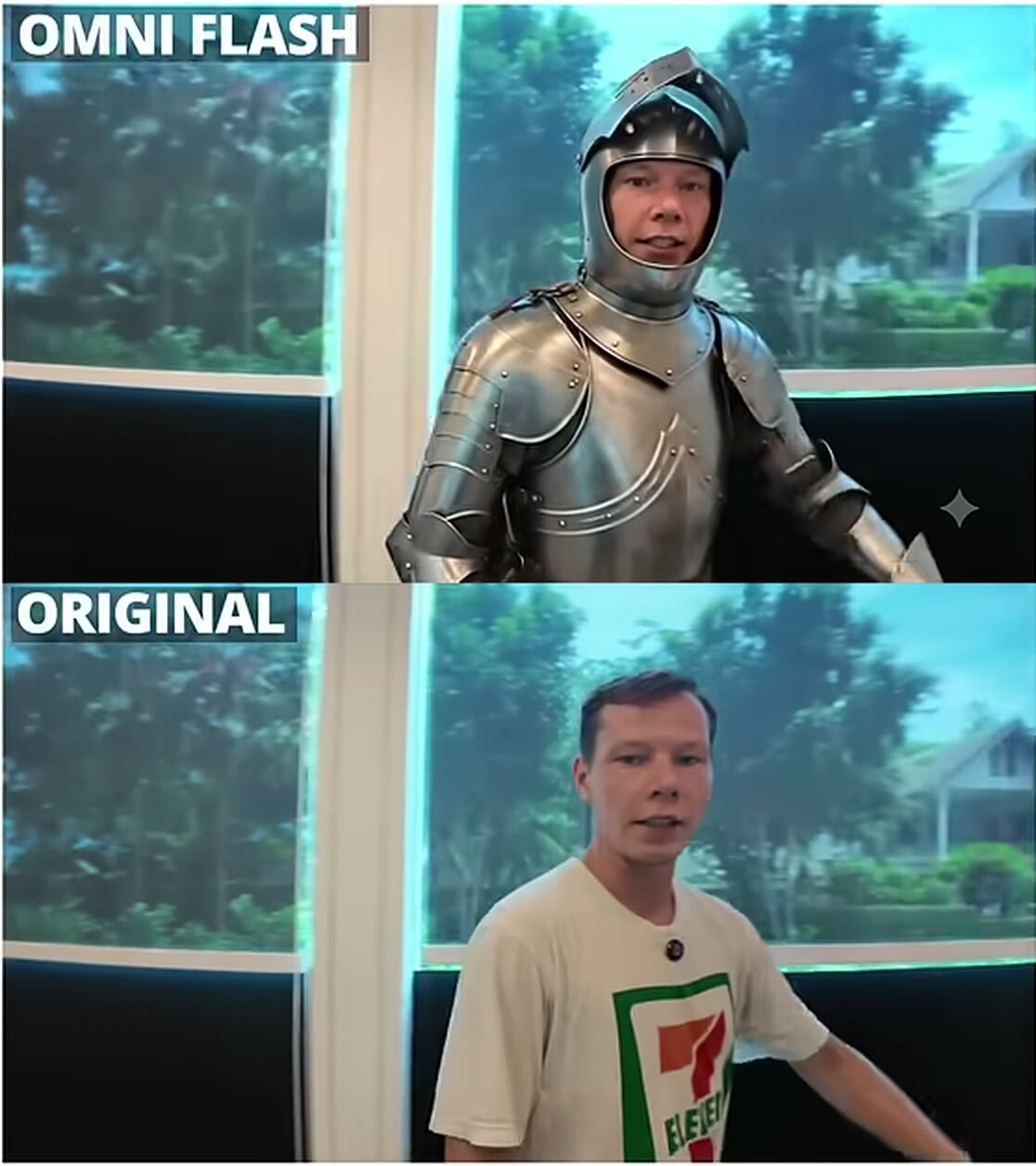
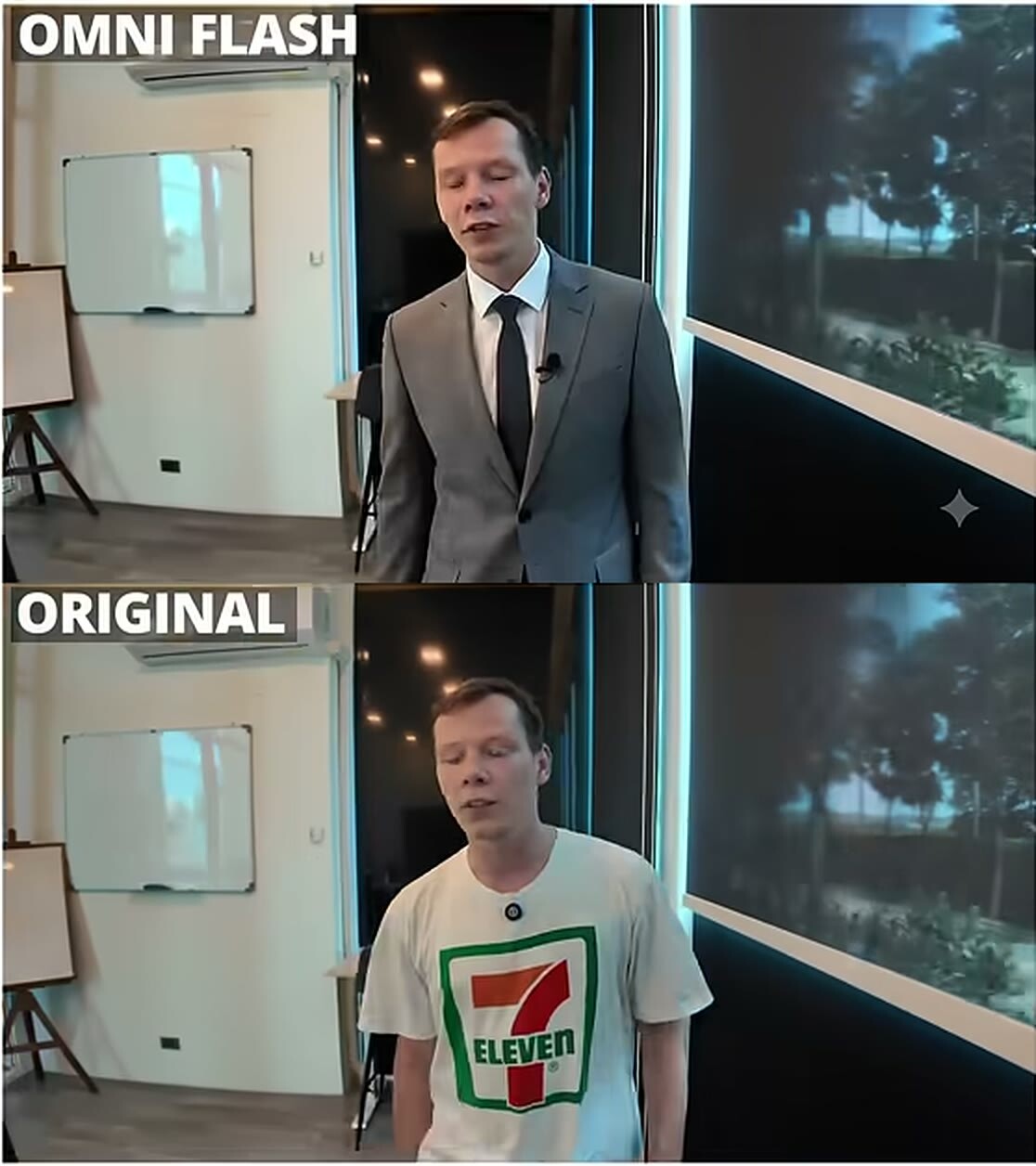
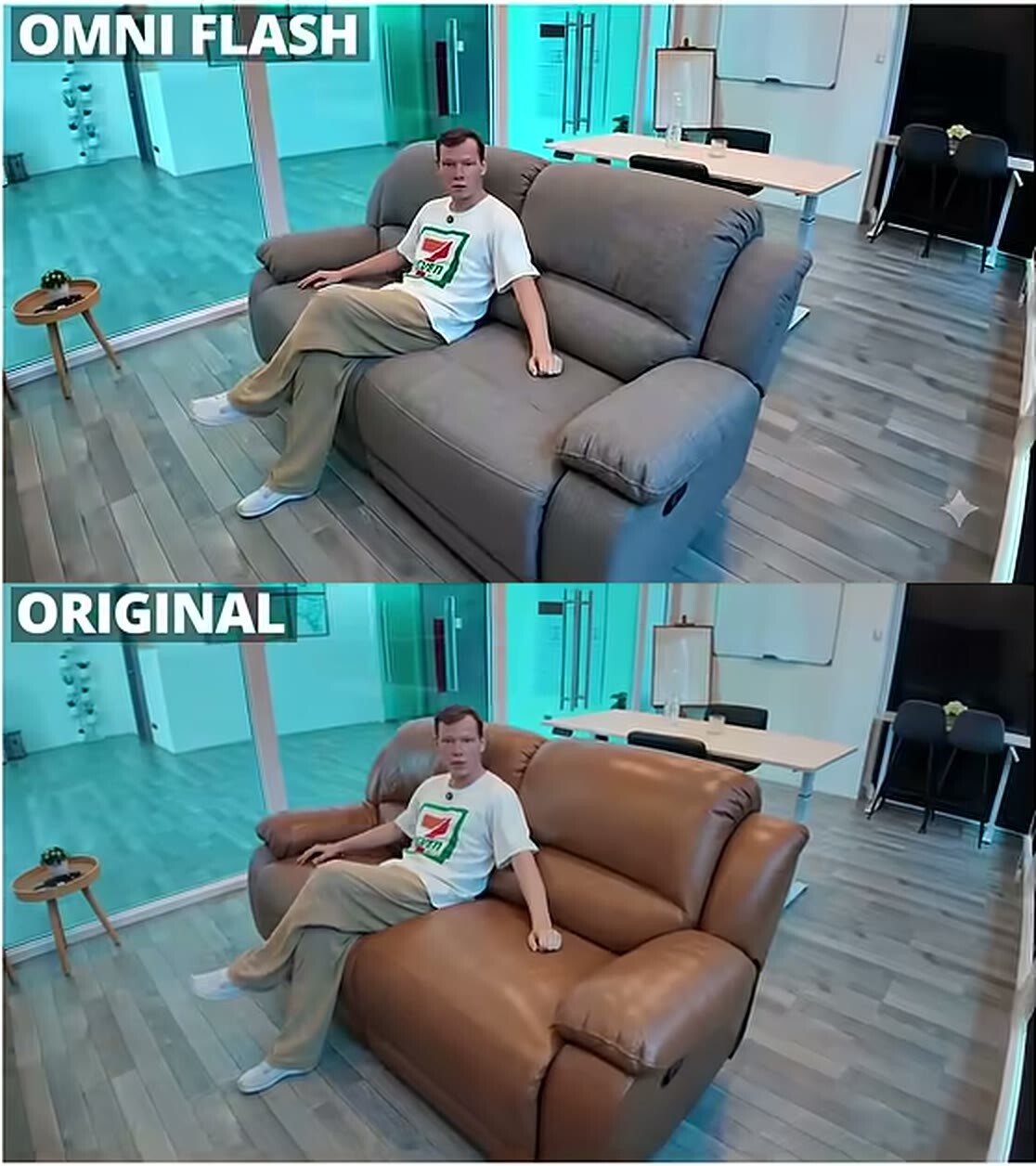
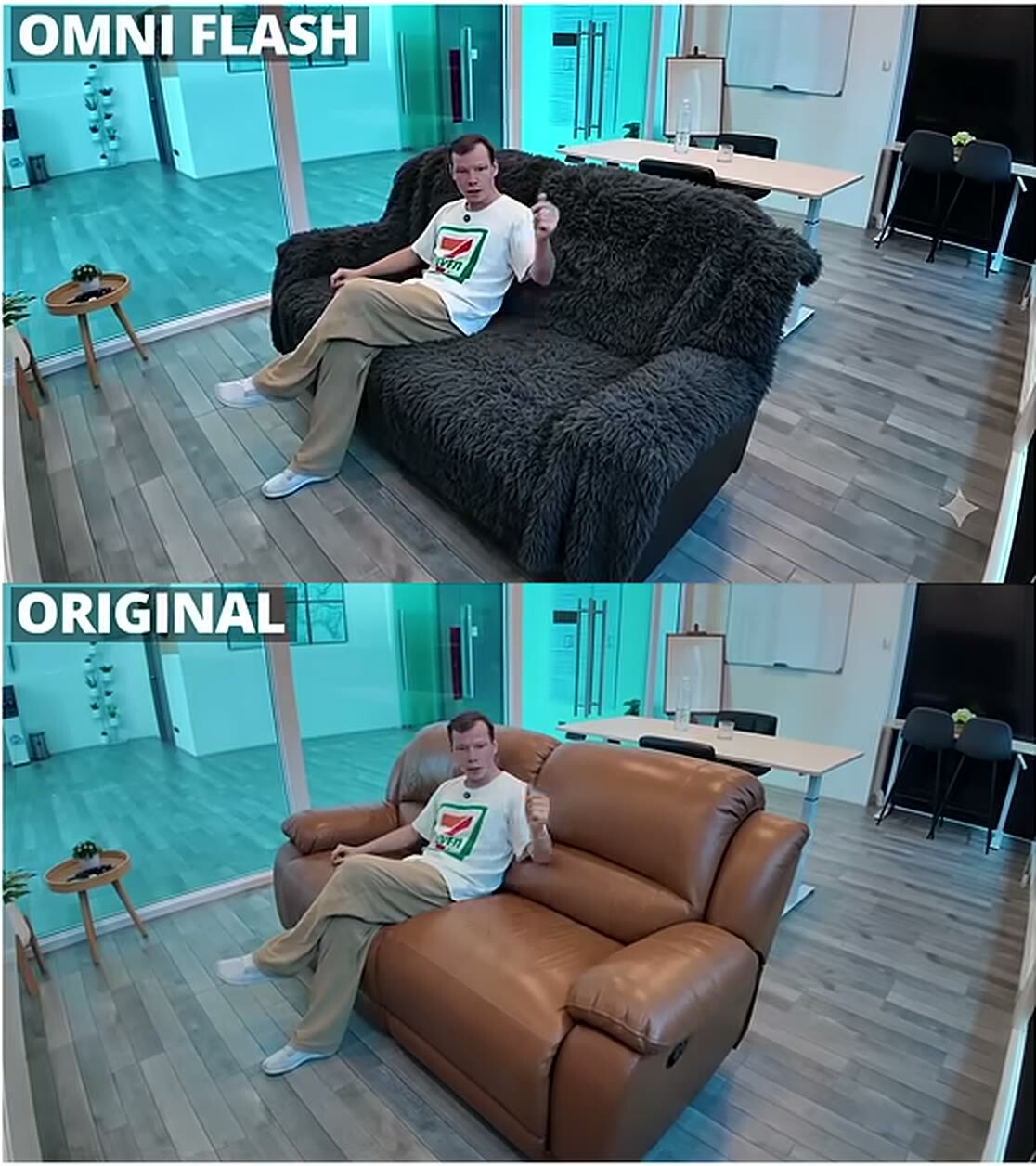
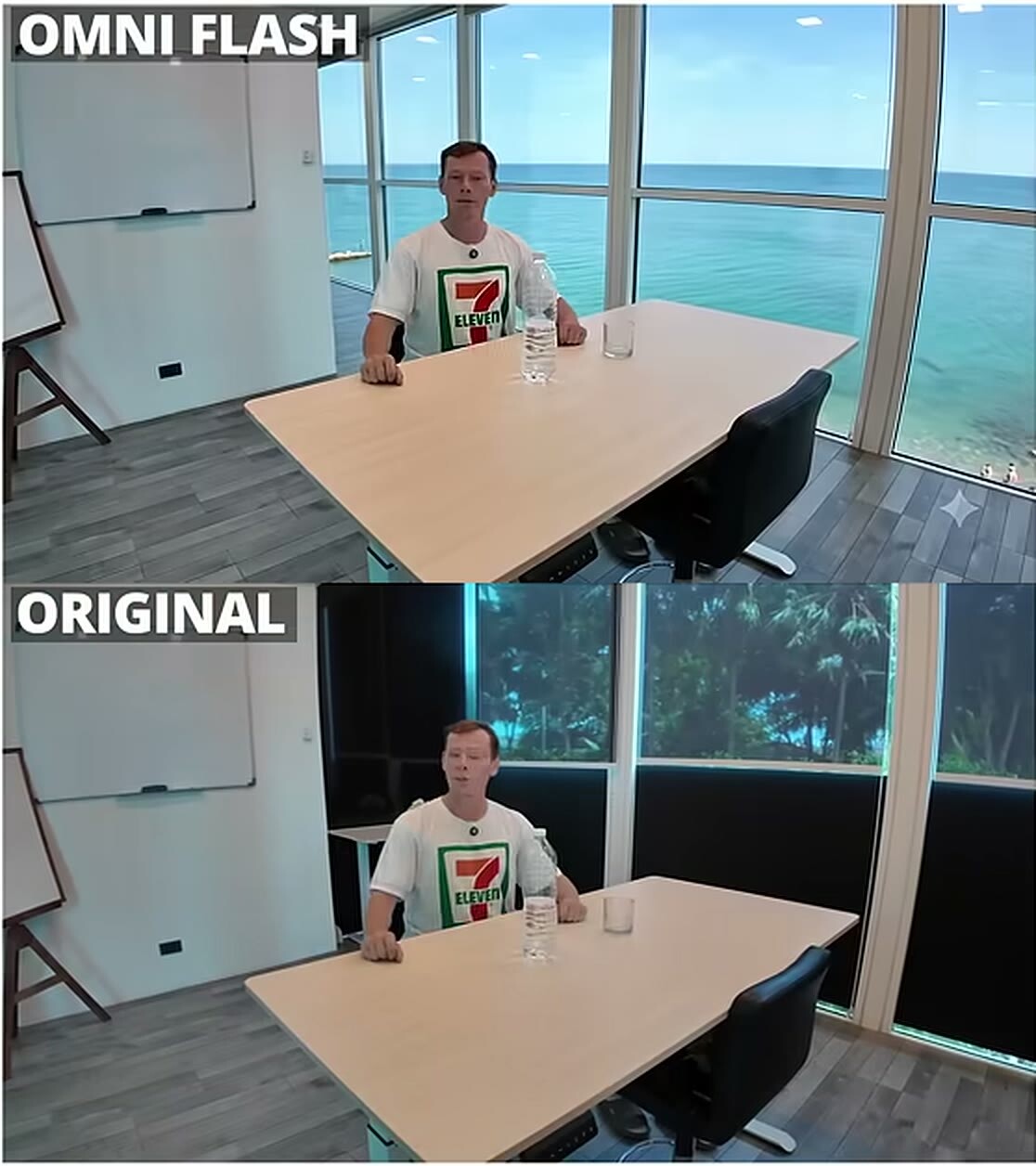
For the before-and-after test I recorded an ordinary video in a room with a whiteboard and changed details one by one. In every frame below, the bottom half is the original and the top half is the Omni Flash result.
Clothes: a T-shirt turned into a business suit
Clothes change convincingly. My face and pose stay mine; only the thing I named in the prompt changes. A T-shirt became a suit, and in another take, knight armor.
Knight armor instead of a T-shirt, the window background survived
Furniture and space give in too. A brown leather sofa became a gray fabric one in one take and a black fuzzy one in another.
Sofa: leather replaced with gray fabricSame clip, different prompt: a black fuzzy sofa
The background changes the same way: instead of the greenery outside the window, one take shows the sea.
Background outside the window: the sea instead of greenery
This is where Omni Flash does something other generators do badly. Effects that interact with real footage are the hard part, and Seedance distorts them nine times out of ten. Editing a live shot instead of building a new one is this model's main card.
Where Omni Flash breaks
This is what I found over two weeks and dozens of generations.
Negations. A prompt like "don't change the background" gets read as "change the background". Describe only what you want to see.
Overloaded prompts. When I asked for speech translation, a new background and new clothes in one go, the result was total chaos. Translation combined with a background swap redrew my face; I had asked too much of the model. My rule is one change per prompt, and if I need another, it becomes the next edit on top of the result.
Very dynamic video. After dozens of generations on fast scenes I concluded that you lose time and still don't get the result. Omni works best on calm shots where the camera isn't whipping around. If a motion has to happen at a certain second, pin it to that second in the prompt.
Moderation. This part is a lottery. A prompt with Tony Stark didn't pass; one with Spider-Man did. I called it "pure randomness".
Speech translation. The model can translate speech and keep your voice. But don't demand too much: the simpler the shot, the cleaner the result.
If you use it not as an editor but as a text-to-video generator, it is weak. It is cheap, though, and decent enough. For social media, yes; for film, no. On the same prompt I liked Veo more. But remember where we came from: the first video models from Kling and Runway gave sad results, and the first version of Omni Flash already gives good ones. For a first-generation model, that is a strong start.
Reels editing: where it turned out useful
Editing is a separate story. I opened After Effects or Fusion in DaVinci a couple of times and understood it wasn't for me. With Omni Flash I found another route: I cut a reel into ten-second pieces, upload the pieces to the model, and a text AI writes the prompts for them. That is how I got animation, infographics and titles.
A word on cost right away. I refined the skill for this workflow for two or three weeks and burned a huge number of credits in my AI assistant doing it. Once the skill is ready, though, one piece of a reel takes about five minutes. For a similar route with still images, read photo to video AI: how to turn one photo into a clip.
Omni Flash or Seedance 2.5: which to pick
Short version: if you need to slightly fix a shot you already filmed, take Omni Flash. If you need new camera angles from a single take, take Seedance.
After Seedance 2.5 came out, I said it did what Gemini Omni Flash couldn't: cloning new camera angles from one angle. Editing your own video in Seedance 2.5 also got easier: it edits by timecode and does it on the first try, whereas through Omni Flash it used to be fiddly and everything regenerated from scratch. More in my article Seedance 2.5: what it is and how to use it.
Omni Flash stays in my working set specifically for fixing live footage. I test my own effects on short trial shots at home first.
What next
For a first result, what's above is enough: one shot, one change and calm motion. I post deeper breakdowns and lessons in English on Patreon.
Now the debatable question. Will editing finished video become the main job for AI models, with generation from scratch pushed to second place once models learn to hold faces and physics steadily? I think the editor will outlive the generator: the client already has footage, and it needs fixing. If you think otherwise, I'd like to hear the counterargument.
FAQ
What is Gemini Omni Flash?
It's a Google model that takes text, images, audio and video and changes a finished video from your prompt. For me it is first of all an editor: it swaps clothes, furniture and backgrounds and adds objects.
Does Omni Flash replace Veo?
No. As a video generator it is weaker: on the same prompt I like Veo more. But Omni Flash is cheaper and better at editing footage you already shot.
Why does Omni Flash change what I asked it not to touch?
It handles negations badly: "don't change the background" reads as "change the background". Write what you want to get and ask for one change at a time.
Can I use Omni Flash to edit videos for social media?
Yes, the quality is enough for social, not for film. My reel-editing skill is built on ten-second pieces; once set up, one piece takes about five minutes.
Gemini Omni Flash vs Seedance 2.5: which one should I use?
To slightly change a shot you already filmed, use Omni Flash. For new camera angles from one take, use Seedance 2.5.